Wow, it’s only taken me nearly three years to release something. I had grand ideas of remixes, house records, techno tracks but all fell by the wayside. Confidence, time and real life all got in the way. Enough excuses and on with the news. Drama Nonsense will hopefully be out next month. On bandcamp from the 7th of May and then streaming from 14th subject to approvals.
About the release
Track one : Drama A nod to the bygone era of 60s/70s thriller B movies chaos and suspense in equal measures.
Track two: Nonsense Is just that! 7 odd minutes of joy and nonsense. Amen rinse out that looks back to early days of jungle with the techniques used in creating the breaks.
Have a listen below. Longer previews out nearing release time.
I have always been a fan of 90’s jungle and drum and bass. You can emulate some of the techniques in Bitwig with pretty much stock plug-ins.
Prepare the break
1. Set your project tempo
2 Grab your break. For this demo I’ll use a break from the Blu Mar Ten sample pack.
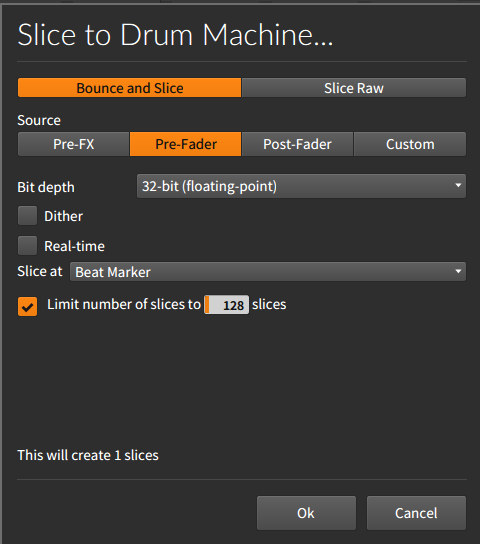
3 I personally use these settings for the crispest settings. I also boost the gain just in case the next stage drops the volume.
4 Make sure the break is in time and next right-click on the clip and select slice to drum machine.
Note make sure that you select Slice at Beat Maker so it will create 1 slice and 32-bit to stop any dither.
The sampler setup
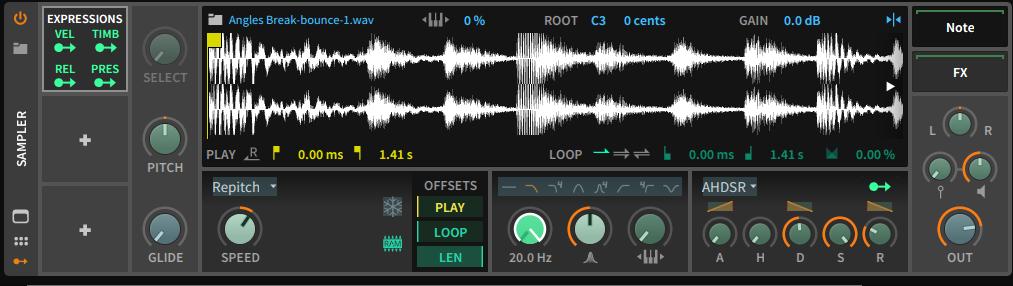
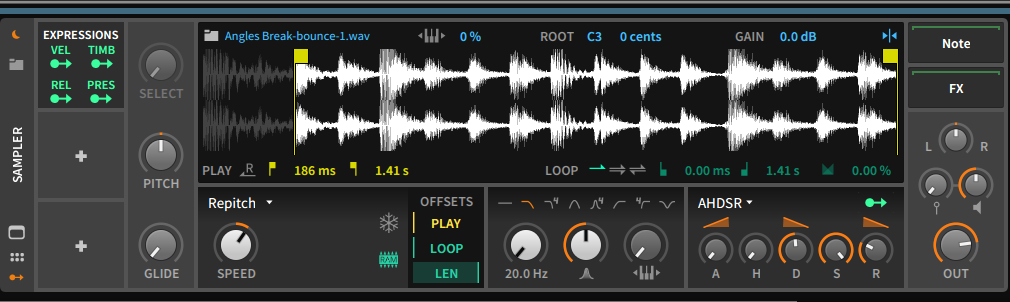
1 First trick is to get the velocity to control the filter.
In the modulators section add an Expressions module and set it to modulate the cutoff filter on the pad sampler. Next set the Velocity sensitivity to Zero. This will allow you to use the note velocity to control the cutoff without losing any volume.
2 Set up your start points. Once happy with filter thresholds duplicate the first drum pad for each sample start point for break.
Since the break is in time with the tempo project you should have little issue with timing.
Below is an example of a basic pattern
3. The poor man’s delay. I must give props to this You Tube video for this tip.
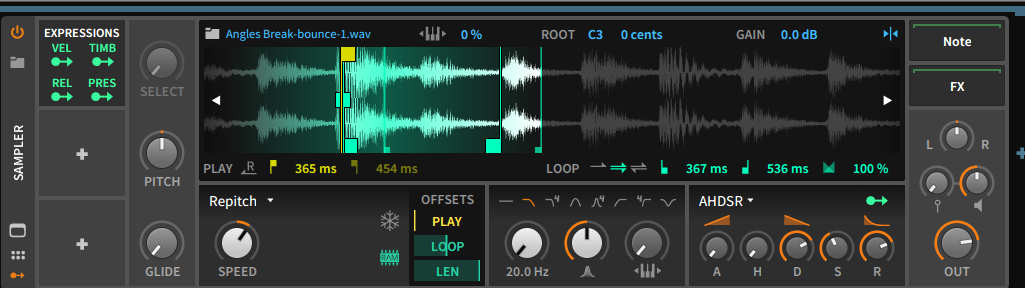
Find a suitable hit you want to add the pseudo delay to. Set loop start and end points round it and then increase the release value of the AHDSR and adjust to taste.
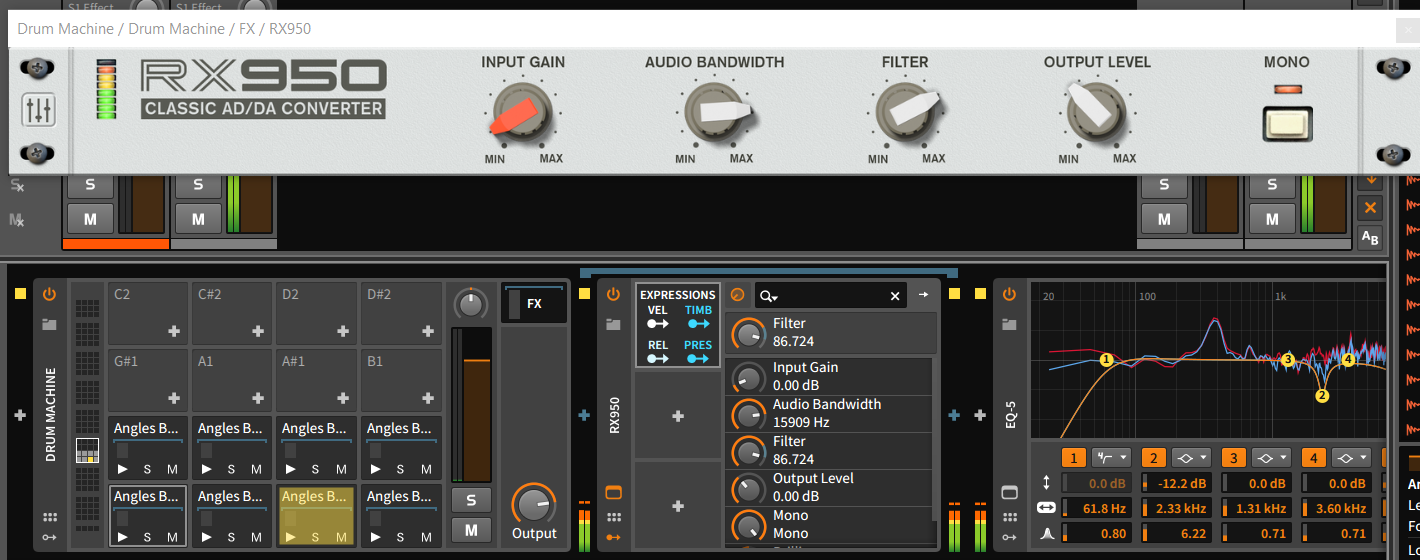
Finally to add a bit more old school grit, use the brilliant RX950 DA Converter and adjust the levels of crust to taste.
You can also modulate the filter on the RX950 using the VEL setting from the Expressions modulator to get something similar to s950 filter sound.
So my first release “Trac Series One” was released on Amuse,io on the 5th of October 2018. Amuse is a great platform for anyone wanted to do DIY releases to the main 12 streaming platforms. When you set your release up it asks for a 44.1k 16 bit wav and the cover art must be at least 3000×3000 pixels and no more 6000×6000 pixels.
So I had the music covered, even had it professionally mastered for the release. However I was at a loss about creating the artwork and branding. As a graphic designer, I’m a good music producer (yes that bad). I have one laptop and one Chromebook. I like to keep the laptop as pure as possible for music so no graphic apps. Chromebook has little to offer.
The first attempt was on Adobe Comp on the iPhone of all things…. So this is where my friend from Sweden Christian Bjurinder steps in. By day he is a fantastic graphic designer and by night a talented producer and DJ (Chuck Cogan) of many years.
He came up with the artwork for the release and the branding on this site and all my other outlets. Nothing was too much trouble and came up with the designs in the flash.
And the rest they say was history 🙂
Oh yeah below is a link to my Bandcamp site where you can stream or purchase Trac Series One.
In my previous post, I mention music is my hobby and not my day job and I thought I would share my ramblings about my creations. I enjoy making music and I have this philosophy : I can have finished items sitting on my hard drive or I can release them on to the general public and one or two people may stream and or buy it.
I’ts not really a social thing either. I have a newly created Facebook page, Instagram and Twitter. My page is dead by the virtue that any post is held hostage until you pay Facebook inc some money to “boost” your page. Twitter is really noisy and the real bizarre thing is Instagram is my most active social site. How mad is that? a site that was originally about photography is where someone posts about music on it… What string times we live in. I really respect Dom Kane’s attitude about social media and the music generally, which along side EL Hornet’s posts on twitter about doing stuff for yourself and not for the “likes” sort of got me on this journey.
I also want to share any tips, tricks and secret weapons that I find along the way. So if you work alone sometimes you think how do I do that? and it would be nice to bounce ideas with someone. Hit me up and I’ll see if I can help.
Hi and welcome to the first of many (I hope) blog posts regarding my adventures in music making using just a laptop, set of headphones and an audio interface. The purists out there will reel in horror at that statement, but first some history.
Music is my hobby, my release whilst holding down a day job. I don’t have the space or the justification for a purpose-built acoustically treated room. This is my compromise.
Daw of choice is Bitwig. For the interface, I use an Audient ID4. I have recently purchased a pair of beyerdynamic DT 770 (250 ohm edition). The laptop is a run of the mill Dell i7 laptops. To add some control I have also purchased Sonarworks Reference 4 Headphone edition to try and get as neutral listening experience as possible.
I have released my first track out in streaming stores and BandCamp.


 Track in the box