
I have always been a fan of 90’s jungle and drum and bass. You can emulate some of the techniques in Bitwig with pretty much stock plug-ins.
Prepare the break
1. Set your project tempo
2 Grab your break. For this demo I’ll use a break from the Blu Mar Ten sample pack.
3 I personally use these settings for the crispest settings. I also boost the gain just in case the next stage drops the volume.
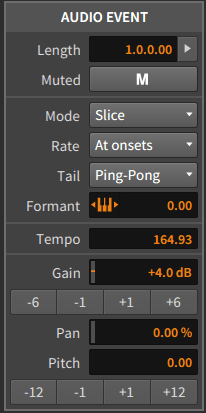
4 Make sure the break is in time and next right-click on the clip and select slice to drum machine.
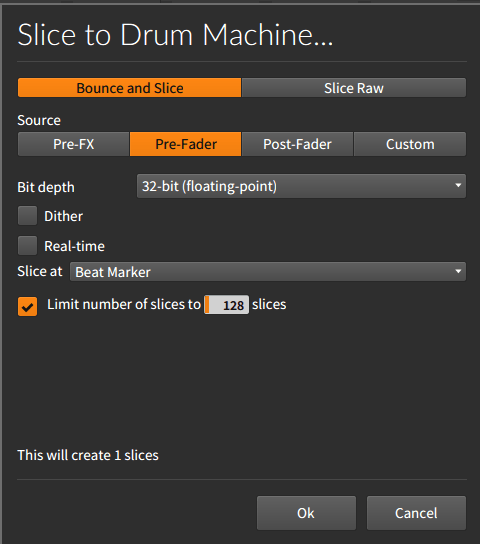
Note make sure that you select Slice at Beat Maker so it will create 1 slice and 32-bit to stop any dither.
The sampler setup
1 First trick is to get the velocity to control the filter.
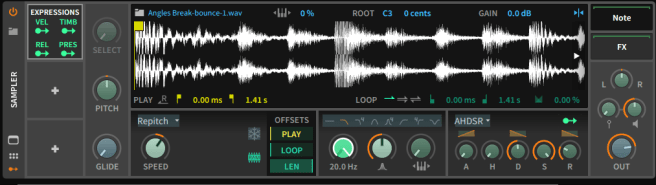
In the modulators section add an Expressions module and set it to modulate the cutoff filter on the pad sampler. Next set the Velocity sensitivity to Zero. This will allow you to use the note velocity to control the cutoff without losing any volume.
2 Set up your start points. Once happy with filter thresholds duplicate the first drum pad for each sample start point for break.
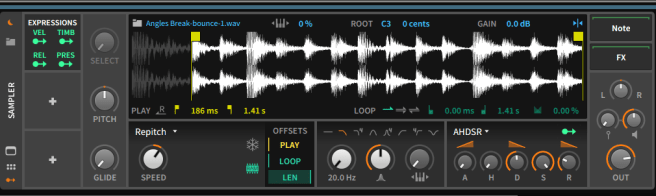
Since the break is in time with the tempo project you should have little issue with timing.
Below is an example of a basic pattern
3. The poor man’s delay. I must give props to this You Tube video for this tip.
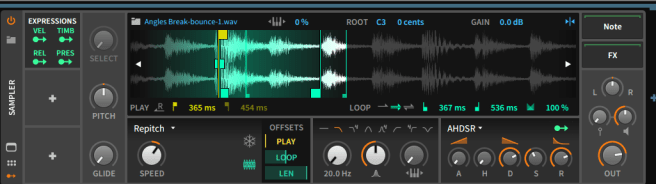
Find a suitable hit you want to add the pseudo delay to. Set loop start and end points round it and then increase the release value of the AHDSR and adjust to taste.
Finally to add a bit more old school grit, use the brilliant RX950 DA Converter and adjust the levels of crust to taste.
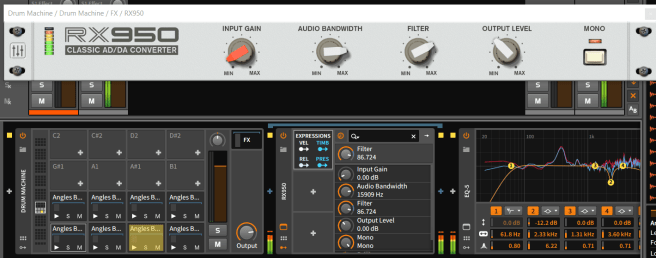
You can also modulate the filter on the RX950 using the VEL setting from the Expressions modulator to get something similar to s950 filter sound.
The result.

 Track in the box
Can we get a video tutorial?
LikeLike
Hey my man! Nice tutorial. The link to the poor man’s delay no longer works. Do you have time to elaborate?
Thanks!
LikeLike
Sure, the video talked about setting up an Akai s2000 and assigning samples to key groups etc. The poor mans delay talked about how people got round not having the DSP expansions in the sampler and creating a delay type effect on a isolated hit by using a different ADSR envelope. Set loop start and end points round it and then increase the release value of the AHDSR and adjust to taste.
LikeLike